Wednesday, September 17, 2014

Free hands-on Vernier workshops

Hands-on Vernier workshops coming to your area, and seats are still available.
  • Data-Collection Workshop in Evansville, IN

  • Data-Collection Workshop in Louisville, KY

    • Wednesday, October 8, 2014
    • 4:00 - 8:00 PM
    • Hilton Garden Inn Louisville Airport
      2735 Crittenden Drive
      Louisville, KY 40209
    • Details and registration »
  • Data-Collection Workshop in Lexington, KY

Backing up your Mac hard drive

Every time I send out a laptop for a hardware repair I always back up the data just in case the drive should be wiped, it has happened.  However, it is always a good idea to take it upon yourself to back up your data.  Here is a handy guide from Apple that outlines different back up protocols https://www.apple.com/support/backup/


Friday, August 22, 2014

Student Groupwise Accounts

Since we have moved to virtual servers some of you may be experiencing some issues with not being able to log into Groupwise.  The first troubleshooting step is to make sure you have the correct address path.  The path should be sparta.sayreschool.org.  If you are still having issues come see me.

Thursday, May 22, 2014

Coursera Teacher PD

Summer is the perfect time for teachers who want to catch up on some Professional Development for which there was no time during a hectic school year.  For those of you not wanting to travel to a conference but yearning for some engagement and interested in some on-line courses, Coursera offers courses on instruction, emerging technologies, and more.  The classes are part of the free Coursera Teacher PD that runs all summer long.  Take a look and see if there is something that suits your needs. 

Friday, May 16, 2014

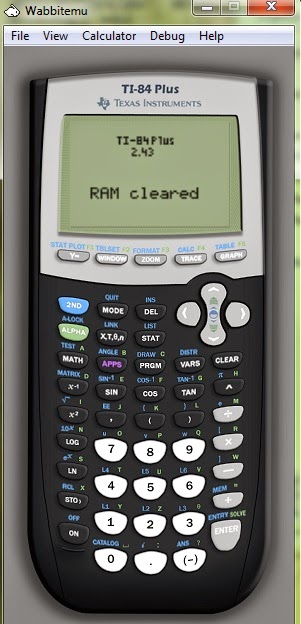
TI Calculator Emulator

 Next year we will be putting the  TI-84 calculator emulator on the student laptops so that all students can have access to a virtual calculator.  I have installed it on the math teachers but since it has recently become available for Android and Mac users it seems like a perfect time to make it available to the students.  I think it is a fantastic tool!  If you need it installed on your laptop follow the directions below or come see me and I will get you started.  The site WabbitStudio Z80 Software tools is where you can get the downloads.  Once you are on the page simply click on the downloads button.  Once downloaded, click on the executable for set up.  Before set up can begin it will ask you for a ROM image which is required to for the  TI emulator calculator.  At this point you may plug your calculator into the laptop and search for the ROM image, or create a ROM image from using open source software.  You will need to make sure you save the ROM file and do NOT delete the file at a later date.  Now you can launch Wabbit EMU and the emulator should display on your desktop.  Make sure you choose to enable skin under the view menu.  If you are a Macbook Pro user the directions are a little different and you will need a PC to get the ROM image.  Choose from the downloads menu and select the Mac OSX version.  Copy the ROM image from your PC to the desktop of your MacBook Pro and when prompted navigate to the file. 

Tuesday, April 22, 2014

Screen Cast O Matic


For those students in Dr. Everts class who would prefer to use the web version of Screencast O Matic you may first need to install the java plugin.  If you are using version OSX 10.7 or higher, you will need to download the plugin from the java site, http://java.com/en/download/manual.jsp.  

For those of you who had trouble downloading the application and need to try again, go to http://www.screencast-o-matic.com/ and click on the download and install.  Then click on the green download button, click to save the .dmg.  Once you have downloaded the application you can run the .dmg and place it in the applications folder.  Launch the Screen Cast O Matic from your applications folder. 

Wednesday, April 16, 2014

Trouble with Google search

If you have been having trouble with your Google search, this may be why, below is an email sent out from our network administrator.
 
An issue has developed with the recent release of Firefox 28.  You may have encountered this already.  Something in the update conflicts with Safe Search, affecting Google especially.  Safe Search is enabled on our web filter, and it removes "inappropriate" content from search results.  This is based on what the search engine deems inappropriate.  You essentially cannot search through Google.
 
I've encountered this on my own Windows desktop, and several users on campus, both Mac and Windows.  In my case, I've rolled back to the previous version, 27.0.1.  First, I backed up my bookmarks, and then completely uninstalled Firefox.  I downloaded an older version from here.